Spring REST Docs 개요
- Spring REST Docs는 테스트 코드 기반으로 RESTful 서비스를 문서화 할 수 있게 도와주는 도구입니다.
- 기본적으로 Asciidoc을 사용하며 작성된 테스트 코드에 의해 html 파일을 생성해줍니다.
- 테스트로 자동 생성된 스니펫을 사용하여 문서를 생성합니다.
Spring REST Docs 채택 이유
- Swagger는 API 동작을 테스트 하기에는 좋으나 명료한 문서 제공용으로는 부족합니다.
- REST API 문서를 깔끔하게 제공하고 싶어서 swagger를 사용하다가 Spring REST Docs로 전환하게 되었습니다.
Spring REST Docs 적용하기
의존성 추가
<dependency>
    <groupId>org.springframework.restdocs</groupId>
    <artifactId>spring-restdocs-mockmvc</artifactId>
    <scope>test</scope>
</dependency>
RestDocsConfig
- 스니펫 결과를 보기 좋게 출력하기 위한 빈을 정의합니다.
@TestConfiguration
public class RestDocsConfig {

    @Bean
    public RestDocsMockMvcConfigurationCustomizer restDocsMockMvcConfigurationCustomizer() {
        return configurer -> configurer.operationPreprocessors()
                .withRequestDefaults(prettyPrint())
                .withResponseDefaults(prettyPrint());
    }
}
적용 전
{"name":"kg","exchangeUnitName":"g","exchangeQuantity":1000.0,"_links":{"self":{"href":"http://localhost:8080/units/kg"},"units-read":{"href":"http://localhost:8080/units"},"profile":{"href":"/docs/index.html#resources-units-create"}}}
적용 후
{
  "name" : "kg",
  "exchangeUnitName" : "g",
  "exchangeQuantity" : 1000.0,
  "_links" : {
    "self" : {
      "href" : "http://localhost:8080/units/kg"
    },
    "units-read" : {
      "href" : "http://localhost:8080/units"
    },
    "profile" : {
      "href" : "/docs/index.html#resources-units-create"
    }
  }
}
샘플 테스트 코드
- @AutoConfigureRestDocs 애노테이션을 추가해야 합니다.
@RunWith(SpringRunner.class)
@SpringBootTest
@AutoConfigureMockMvc
@AutoConfigureRestDocs
@ActiveProfiles("test")
@Import({RestDocsConfig.class, EmbeddedRedisConfig.class})
@Ignore
public class ControllerTest {

        @Autowired
        private MockMvc mockMvc;

        @Autowired
        private ObjectMapper objectMapper;

        @Test
        public void When_단위_저장_Then_정상_리턴() throws Exception {

                // Given
                UnitRequest unitRequest = UnitRequest.builder()
                        .name("kg")
                        .exchangeUnitName("g")
                        .exchangeQuantity(1000D)
                        .build();

                // When
                final ResultActions actions = this.mockMvc.perform(post("/units")
                        .param("userId", "1001")
                        .contentType(MediaType.APPLICATION_JSON)
                        .accept(MediaTypes.HAL_JSON)
                        .content(this.objectMapper.writeValueAsString(unitRequest)));

                // Then
                actions.andDo(print())
                        .andExpect(status().isCreated())
                        .andExpect(header().string(HttpHeaders.CONTENT_TYPE, MediaTypes.HAL_JSON_UTF8_VALUE))
                        .andExpect(header().exists(HttpHeaders.LOCATION))
                        .andExpect(jsonPath("name").value(unitRequest.getName()))
                        .andExpect(jsonPath("exchangeUnitName").value(unitRequest.getExchangeUnitName()))
                        .andExpect(jsonPath("exchangeQuantity").value(unitRequest.getExchangeQuantity()))
                        .andExpect(jsonPath("_links.self").exists())
                        .andExpect(jsonPath("_links.units-read").exists())
                        .andExpect(jsonPath("_links.profile").exists())
                        .andDo(document("units-create",
                                links(
                                        linkWithRel("self").description("현재 API"),
                                        linkWithRel("units-read").description("단위 조회 API"),
                                        linkWithRel("profile").description("프로파일 링크")
                                ),
                                requestHeaders(
                                        headerWithName(HttpHeaders.ACCEPT).description("Accept 헤더"),
                                        headerWithName(HttpHeaders.CONTENT_TYPE).description("Content type 헤더")
                                ),
                                requestFields(
                                        fieldWithPath("name").description("단위 이름"),
                                        fieldWithPath("exchangeUnitName").description("환산 단위"),
                                        fieldWithPath("exchangeQuantity").description("환산 단위의 수량")
                                ),
                                responseHeaders(
                                        headerWithName(HttpHeaders.CONTENT_TYPE).description("Content type 헤더")
                                ),
                                responseFields(
                                        fieldWithPath("name").description("단위 이름"),
                                        fieldWithPath("exchangeUnitName").description("환산 단위 이름"),
                                        fieldWithPath("exchangeQuantity").description("환산 단위 수량"),
                                        fieldWithPath("_links.self.href").description("현재 API"),
                                        fieldWithPath("_links.units-read.href").description("단위 조회 API"),
                                        fieldWithPath("_links.profile.href").description("프로파일 링크")
                                )
                        ));
        }
}
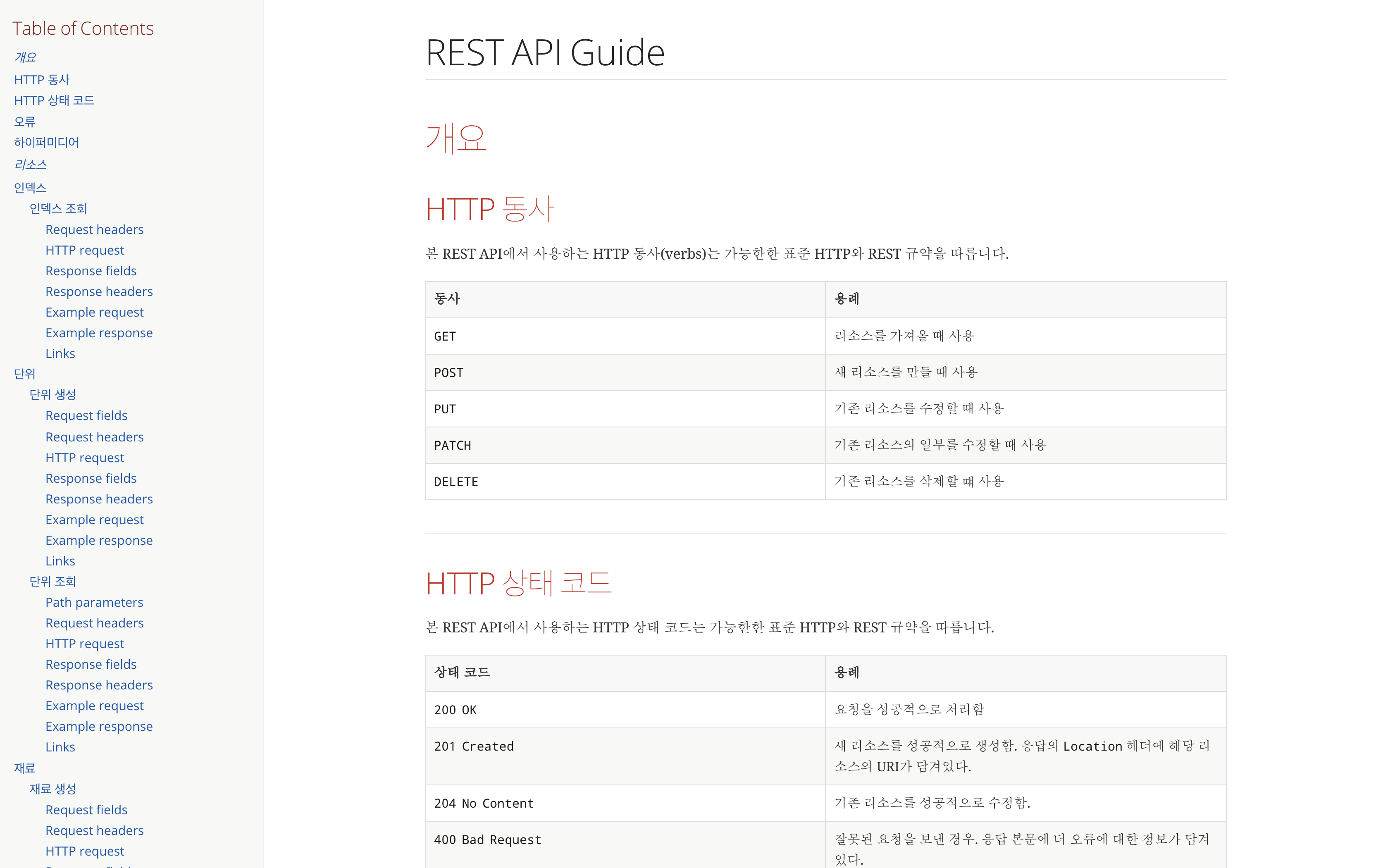
index.adoc
= REST API Guide
:doctype: book
:icons: font
:source-highlighter: highlightjs
:toc: left
:toclevels: 4
:sectlinks:
:operation-curl-request-title: Example request
:operation-http-response-title: Example response

[[overview]]
= 개요

[[overview-http-verbs]]
== HTTP 동사

본 REST API에서 사용하는 HTTP 동사(verbs)는 가능한한 표준 HTTP와 REST 규약을 따릅니다.

|===
| 동사 | 용례

| `GET`
| 리소스를 가져올 때 사용

| `POST`
| 새 리소스를 만들 때 사용

| `PUT`
| 기존 리소스를 수정할 때 사용

| `PATCH`
| 기존 리소스의 일부를 수정할 때 사용

| `DELETE`
| 기존 리소스를 삭제할 떄 사용
|===

[[overview-http-status-codes]]
== HTTP 상태 코드

본 REST API에서 사용하는 HTTP 상태 코드는 가능한한 표준 HTTP와 REST 규약을 따릅니다.

|===
| 상태 코드 | 용례

| `200 OK`
| 요청을 성공적으로 처리함

| `201 Created`
| 새 리소스를 성공적으로 생성함. 응답의 `Location` 헤더에 해당 리소스의 URI가 담겨있다.

| `204 No Content`
| 기존 리소스를 성공적으로 수정함.

| `400 Bad Request`
| 잘못된 요청을 보낸 경우. 응답 본문에 더 오류에 대한 정보가 담겨있다.

| `404 Not Found`
| 요청한 리소스가 없음.
|===

[[overview-errors]]
== 오류

에러 응답이 발생했을 때 (상태 코드 >= 400), 본문에 해당 문제를 기술한 JSON 객체가 담겨있다. 에러 객체는 다음의 구조를 따른다.

include::{snippets}/errors/response-fields.adoc[]

예를 들어, 잘못된 요청으로 레시피를 만들려고 했을 때 다음과 같은 `400 Bad Request` 응답을 받는다.

include::{snippets}/errors/http-response.adoc[]

[[overview-hypermedia]]
== 하이퍼미디어

본 REST API는 하이퍼미디어와 사용하며 응답에 담겨있는 리소스는 다른 리소스에 대한 링크를 가지고 있다.
응답은 http://stateless.co/hal_specification.html[Hypertext Application from resource to resource. Language (HAL)] 형식을 따른다.
링크는 `_links`라는 키로 제공한다. 본 API의 사용자(클라이언트)는 URI를 직접 생성하지 않아야 하며, 리소스에서 제공하는 링크를 사용해야 한다.

[[resources]]
= 리소스

[[resources-index]]
== 인덱스

인덱스는 서비스 진입점을 제공한다.

[[resources-index-access]]
=== 인덱스 조회

`GET` 요청을 사용하여 인덱스에 접근할 수 있다.

operation::index[snippets='request-headers,http-request,response-fields,response-headers,curl-request,http-response,links']

[[resources-units]]
== 단위

단위 리소스는 단위를 만들거나 조회할 때 사용한다.

[[resources-units-create]]
=== 단위 생성

`POST` 요청을 사용해서 새 단위를 만들 수 있다.

operation::units-create[snippets='request-fields,request-headers,http-request,response-fields,response-headers,curl-request,http-response,links']

[[resources-units-read]]
=== 단위 조회

`GET` 요청을 사용해서 기존 단위 하나를 조회할 수 있다.

operation::units-read[snippets='path-parameters,request-headers,http-request,response-fields,response-headers,curl-request,http-response,links']

[[resources-materials]]
== 재료

재료 리소스는 재료를 만들거나 조회할 때 사용한다.

[[resources-materials-create]]
=== 재료 생성

`POST` 요청을 사용해서 새 재료를 만들 수 있다.

operation::materials-create[snippets='request-fields,request-headers,http-request,response-fields,response-headers,curl-request,http-response,links']

[[resources-materials-read]]
=== 재료 조회

`GET` 요청을 사용해서 기존 재료 하나를 조회할 수 있다.

operation::materials-read[snippets='path-parameters,request-headers,http-request,response-fields,response-headers,curl-request,http-response,links']

[[resources-materials-query]]
=== 재료 조회

`GET` 요청을 사용해서 기존 재료 하나를 조회할 수 있다.

operation::materials-query[snippets='request-parameters,request-headers,http-request,response-fields,response-headers,curl-request,http-response,links']

[[resources-recipes]]
== 레시피

레시피 리소스는 레시피를 만들거나 조회할 때 사용한다.

[[resources-recipes-create]]
=== 레시피 생성

`POST` 요청을 사용해서 새 레시피를 만들 수 있다.

operation::recipes-create[snippets='request-fields,request-headers,http-request,response-fields,response-headers,curl-request,http-response,links']

[[resources-recipes-read]]
=== 레시피 조회

`GET` 요청을 사용해서 기존 레시피 하나를 조회할 수 있다.

operation::recipes-read[snippets='path-parameters,request-headers,http-request,response-fields,response-headers,curl-request,http-response,links']

[[resources-recipes-update]]
=== 레시피 수정

`PUT` 요청을 사용해서 기존 레시피를 수정할 수 있다.

operation::recipes-update[snippets='request-fields,request-headers,http-request,response-fields,response-headers,curl-request,http-response,links']

[[resources-recipes-delete]]
=== 레시피 삭제

`DELETE` 요청을 사용해서 기존 레시피를 삭제할 수 있다.

operation::recipes-delete[snippets='path-parameters,request-headers,http-request,response-fields,response-headers,curl-request,http-response,links']

[[resources-recipes-query]]
=== 레시피 리스트 조회

`GET` 요청을 사용하여 서비스의 모든 레시피를 조회할 수 있다.

operation::recipes-query[snippets='request-parameters,request-headers,http-request,response-fields,response-headers,curl-request,http-response,links']

[[resources-recipes-count]]
=== 레시피 건 수 조회

`GET` 요청을 사용하여 서비스의 모든 레시피의 건 수를 조회할 수 있다.

operation::recipes-count[snippets='request-headers,http-request,response-fields,response-headers,curl-request,http-response,links']

[[resources-recipes-readCount]]
=== 레시피 조회 수 증가

`PUT` 요청을 사용해서 레시피의 조회 수를 증가시킬 수 있다.

operation::recipes-readCount[snippets='path-parameters,request-headers,http-request,response-headers,curl-request,http-response,links']

[[resources-recipes-popular]]
=== 인기 레시피 리스트 조회

`GET` 요청을 사용하여 서비스의 모든 인기 레시피를 조회할 수 있다.

operation::recipes-popular[snippets='request-headers,http-request,response-fields,response-headers,curl-request,http-response,links']

[[resources-members]]
== 회원

회원 리소스는 회원를 만들거나 조회할 때 사용한다.

[[resources-members-create]]
=== 회원 생성

`POST` 요청을 사용해서 새 레시피를 만들 수 있다.

operation::members-create[snippets='request-fields,request-headers,http-request,response-fields,response-headers,curl-request,http-response,links']

[[resources-members-read]]
=== 회원 조회

`GET` 요청을 사용해서 기존 회원 하나를 조회할 수 있다.

operation::members-read[snippets='path-parameters,request-headers,http-request,response-fields,response-headers,curl-request,http-response,links']

[[resources-members-update]]
=== 회원 수정

`PUT` 요청을 사용해서 기존 회원을 수정할 수 있다.

operation::members-update[snippets='request-fields,request-headers,http-request,response-fields,response-headers,curl-request,http-response,links']
완성된 REST Docs 문서